Friday, March 23, 2012


Thursday, March 22, 2012
How to Supercharge All Your Favorite Webapps with ifttt
Wouldn't it be handy if every time someone tagged a photo of you on Facebook, that pic were automatically added to your Dropbox folder? If items you starred in Google Reader were automatically added to Instapaper or Read It Later? Or if you received a text message whenever it was going to rain? If This Then That (ifttt) is a brilliant web service that let's you plug information from one service into another, allowing you to link all your favorite webapps to create super-charged integration between tools like Gmail, Dropbox, Instapaper, Facebook, Twitter, Instagram, Foursquare, and oh-so-much more. Here's how to use ifttt to get more from your online life.
How ifttt Works
The service can feel a little tough to grasp when you first dig into it, but it's actually very simple. You can use ifttt in two different ways:
- Create custom Tasks. Tasks allow you to create a work flow based on some sort of conditional statement (the pillar of all programming!). "If [this thing happens on one service], then [do that on another service]." For example, "If I post a new photo to Instagram, then download it to Dropbox."
- Use pre-made Recipes. Recipes are simply pre-built tasks made by other users that you can add to your ifttt account.
In the section below I'll walk through how to create a task from start to finish; then I'll highlight some of my favorite pre-made ifttt recipes that you can start using in a couple of clicks, no setup required. (If you prefer, you can just go straight to the recipes, though I'd recommend reading through how to create a task so you understand the basics.)
How to Create an ifttt Task
As I mentioned above (and as the service's name implies), a task is made of an If ... Then ... statement. Put in ifttt terms, If trigger, then action. The trigger and action are the building blocks of ifttt tasks, and you define them using available channels.
ifttt channels are made up of the services ifttt supports, like Craigslist, Dropbox, Evernote, Facebook, RSS feeds, Flickr, Foursquare, Gmail, Google Reader, Instagram, Instapaper, Last.fm, SMS, Twitter, and so on. You can see all of ifttt's 35 (currently) supported channels here.
To wrap your head around how to create a custom task on ifttt, let's create a simple task on ifttt that automatically downloads Facebook pictures you're tagged in and stores them in your Dropbox folder. (This task is available as a recipe in the section below, but it's a good example, so I'll walk through how to make it yourself first.
Navigate to ifttt's Create a task page (you'll need to sign up if you haven't already). ifttt holds your hand through the task creation process, so when you first visit the task creation page, you'll see this:
Step One: Choose a Trigger Channel
Click the bold this and ifttt will display this channel picker:
You want to trigger this task whenever someone tags a photo of you on Facebook, so Facebook will be your trigger channel. Click Facebook. (If this is the first time you've used the Facebook channel, you'll need to authorize the Facebook channel.)
Step Two: Choose a Trigger
Next you'll see all the possible Facebook triggers built into ifttt. Your options are:
- New status message by you
- You post a new link
- You upload a new photo
- You are tagged in a photo
- Your profile changes
You can create tasks that are triggered by any of those Facebook actions, but for the purpose of this action, we want the You are tagged in a photo action, so click that.
Step Three: Complete Trigger Fields
At this step, you can define trigger fields specific to certain channels. Our Facebook trigger doesn't have any trigger fields (there are no possible variables; it's triggered whenever you're tagged in a photo). When you're using other channels, like the RSS or Craigslist channels, for example, you'd paste a URL you want to watch in this step. (I'll explain a little more about how fields work in step six below.) Since this trigger has no trigger fields, just click Create Trigger. If all went well, you should see this:
Congrats! You've successfully defined your trigger. Now to define the action that follows the trigger. For our task, that means placing the tagged photo into a folder in Dropbox. Click the big blue "that" link to define your action.
Step Four: Choose an Action Channel
Now it's time to pick the channel that will react to our trigger. For our example, as you'd expect, the action channel is Dropbox. So click the Dropbox icon. Again, if this is the first time you're using Dropbox as an ifttt channel, you'll need to authorize it.
Step Five: Choose an Action
Dropbox only has one possible action: Add file from URL. Good news! That's exactly what we want! So click Add file from URL and move on to the next step.
Step Six: Complete Action Fields
If you recall, the tagged photos trigger from our Facebook channel didn't have any fields. Dropbox, on the other hand, does have fields that you need to fill out: The URL of the file you want to add to Dropbox and the folder inside Dropbox where you want to store your tagged photos.
ifttt is smart (brilliant, even), so it already has the action fields filled out so that the File URL is defined as the tagged photo URL on Facebook—which is exactly what you want. It does this using "Addins" that are supplied by default when you choose the Facebook tagged photos trigger. ifttt knows that if that's your trigger, it can supply the action with several attributes. For the Facebook tagged photos trigger, you can use any of the following information in your action fields:
- Uploaded by
- Fb Photo URL (a link to the page on Facebook where the photo is visible)
- Photo Small URL (a shrunk down, thumbnail version of your picture)
- Photo Source URL (this is the URL to the full image—and it's what we're using for File URL, defined by the {{ImageSource}} text you see in the File URL input)
- Photo Caption
- Uploaded Date
So keep File URL as is. You can set the Dropbox folder path input to whatever you like. By default, it's going to create an
ifttt/facebook/taggedfolder inside the root of your Dropbox folder. You can change this to whatever you want.
A note on addins: If you wanted, you could use an addin to, for example, place images in folders based on who took the pic. To do that (and for the purpose of illustration for how you might use addins), click the Dropbox folder path input, click the Addins drop-down, and select Uploaded by. You'll see a description of what the addin text will look like, and if you click the blue Addin tag, ifttt will append the addin to your input. You'll notice in this addin example, the Dropbox folder path becomes
ifttt/facebook/tagged/{{From}}; if I tagged a photo of you, you'd see it in your Dropbox folder atifttt/facebook/tagged/Adam PashOnce you've got your action fields all filled out, click Create Action.
Step Seven: Activate Your Task
You've officially created your first task. High five, baby! At this step you can add a description of your task. Descriptions are particularly useful if you want to share it as a recipe for others to reuse. When you're all finished, click Create.
That's all there is to it. ifttt will check each trigger every 15 minutes; every time a trigger returns true (in this case, whenever you're tagged in a new photo on Facebook), it'll execute the action (sync the photo to Dropbox).
Step Eight: Turn Your Task into a Recipe (Optional)
If you want to share your brilliant task with the world, you can turn it into a recipe. To do so, visit your tasks page and click the task you want to make into a recipe. On the task page, click the recipe icon (it looks like a mortar and pestle).
Give your recipe a description if you like, edit any of the fields, and create your recipe. Yum.
10 of My Favorite ifttt Recipes
Now you know how to create tasks. Awesome! You can scratch a lot of itches by smashing together various channels and using your imagination, but you can also enjoy brilliant recipes other ifttt users have already made. Here are some of my favorites:
Note: Click the image to go straight to the recipe. You may also notice my name in these images; when you activate the recipe, that'll all display your information.
Download Facebook tagged photos to Dropbox
Greet new Twitter followers with a direct message
Save all Instagram photos to Dropbox
Send Google Reader starred items to Instapaper
Put Foursquare check-ins on your Google Calendar
Sync Instagram pics to a Facebook album
Remotely download a torrent by sending a link in an email
Send an IM to ifttt, get an easy-excuse phone call
Post your Instagram pics to Flickr
It's no coincidence that most of my favorites rank high on ifttt's most popular recipes page. Browse through the newest to check out of the more niche recipes, or just to see some of the less obvious uses that haven't risen to the top.
Absurdly Specific
Most recipes have pretty broad uses, but you can use the service to fill really specific needs, too. You could, for example, have ifttt send you an SMS alert when something you're watching for on Craigslist shows up in a search feed.
I'm really into ifttt right now, so I've created a recipe that IMs me whenever someone creates a new ifttt recipe so I can keep track of new tasks I might want to try out. Jenna Wortham created a task that calls her—on the phone—whenever the stoned, non-Netflix-controlled Twitter user Qwikster tweets.
How Are You Using ifttt?
If This Then That is full of potential, which is why people like me love it so much. Whether you've been playing with it since we first covered it last week or today's the first you've tried it out, let's hear about the interesting ways you're using it in the comments.
You can contact Adam Pash, the author of this post, on Twitter, Google+, and Facebook.
 Wouldn't it be handy if every time someone tagged a photo of you on Facebook, that pic were automatically added to your Dropbox folder? If items you starred in Google Reader were automatically added to Instapaper or Read It Later? Or if you received a text message whenever it was going to rain?
 This is one of the coolest new web services I have seen in a while....check it out, you won't be dissappointed.
Wednesday, March 21, 2012
Now this is coffee!!
BBotE FAQ
Q. Does BBotE have any calories?
A. Black Blood of the Earth has a impressive hit of caffeine but the goal was something delicious that this diabetic with a sweet tooth didn’t need to add sugar or cream to. No sugar & no cream means no calories (well, technically two calories as coffee has some nutritional value) and no fat.
Tuesday, March 20, 2012
Human Birdwings | Building a semi human powered flying device
Flying like a bird
Featured
51I did it! This weekend I brought out my wings again for a second test. And here it is. Do I need to say more? Just watch the video
Unbelievable if true....
Tuesday, March 13, 2012
Monday, March 12, 2012
Here's what's wrong with Windows 8 | ZDNet
Here's what's wrong with Windows 8
Summary: Windows 8 is a massive gamble for Microsoft, and right now I can see the potential for it to fail harder than Windows Vista did.
Interesting take on the state of Windows 8.....
Friday, March 09, 2012
Iconic Photos
Iconic Photos
Famous, Infamous and Iconic Photos
Stan Stearns (1935 – 2012)
Stan Stearns, who took the definitive photograph at John F. Kennedy’s funeral, has died, aged 76.

If you love photography you will want to check out this site....
Thursday, March 08, 2012
"Kara" by Quantic Dream - YouTube
This is a fascinating little short on robotic sentiency......
Killer Whale Submarine a killer personal submersible | Crave - CNET
Submarines are awesome. A submarine shaped like a Killer Whale is off-the-charts awesome. It can be yours for a cool $100,000.

It's a whale! It's a submarine! It's a whale submarine!
(Credit: Hammacher Schlemmer)Jules Verne had the market on imaginative submarines cornered for many long years. And then Hammacher Schlemmer came along and offered a $100,000 Killer Whale Submarine.
The Killer Whale Submarine can breach from the water, just like a real whale. It has pectoral fins with control levers and a 255-horsepower supercharged Rotax axial flow engine. I can't really explain what that is exactly, but it sounds super cool.
Sunday, February 19, 2012
Great Acquisitions! Now Put a Fork in ERP | TechCrunch
The bottom line is this: A series of cloud acquisitions won’t help lumbering old ERP one bit. Acquiring cloud companies doesn’t make you a cloud company any more than buying a Giants jersey makes you Eli Manning. It’s not a strategy for an on-premise solutions company. It’s an attempt to distract customers and hope they will forget about the ERP boat anchor they’re stuck with.
The big ERP players had their day, but now it’s coming to an end. This is the classic Innovator’s Dilemma. For too long SAP and Oracle have watched the enterprise market innovate around them, stuck to their knitting and failed to adapt. The cloud technology wave has passed them by, and now it’s too late.
It’s time for SAP and Oracle to either accept that they need to adapt and go all cloud, or accept that they are going to go the way of the mainframe stuffed in the back closet. They won’t die completely. They’ll just become irrelevant.
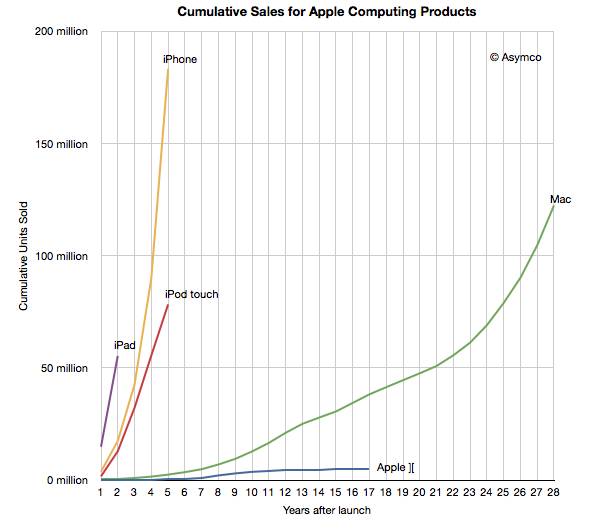
Apple sold more iOS devices in 2011 than all the Macs it sold in 28 years | asymco
Tim Cook on the 55 million iPads sold to date:
This 55 is something no one would have guessed. Including us. To put it in context, it took us 22 years to sell 55 million Macs. It took us about 5 years to sell 22 million iPods, and it took us about 3 years to sell that many iPhones. And so, this thing is, as you said, it’s on a trajectory that’s off the charts.
via Transcript: Apple CEO Tim Cook at Goldman Sachs – Apple 2.0 – Fortune Tech.
That gave me an idea. Here is a plot of each major computing product Apple sold throughout its history shown as a cumulative total since product launch.
The iOS platform as a whole reached 316 million cumulative units at the end of last year. The iOS platform overtook the OS X platform in under four years and more iOS devices were sold in 2011 (156 million) than all the Macs ever sold (122 million).
Minimal Mac | Microsoft's Biggest Miss
Microsoft’s DNA is software. They are primarily a software company. The very name of the company is a mashup of microchip and software. And of all of the software they produce, one is more important than all the rest and a huge revenue source that the very livelihood of the company has come to depend on.
Are you thinking Windows? Wrong.
This is also the main cross-platform software they build. Got it yet? Yep.
Saturday, February 18, 2012
Microsoft's new Windows 8 logo: This one looks like a window | Microsoft - CNET News
The software giant continues its march toward releasing its upcoming operating system, debuting a new logo that does away with the flaglike design of Windows past.

The new Windows 8 logo, with previous Windows logos.
(Credit: Microsoft)Microsoft unveiled a new logo for the upcoming Windows 8, featuring a clean one-color design that leans heavily on its new Metro user interface.
50 years ago, John Glenn became America's biggest hero | Geek Gestalt - CNET News
Monday is the 50th anniversary of NASA astronaut John Glenn's mission to be the first American to orbit the Earth. On that day, Glenn became one of America's most important heroes.

On Feb. 20, 1962, astronaut John Glenn became the first American to orbit the Earth. Here, Glenn is being inserted into Friendship 7, his capsule, prior to launch.
(Credit: NASA)
Sunday, February 05, 2012
The Real Facebook IPO Winners? Sean Parker And Bono - Forbes
The real winners in Facebook’s upcoming public offering will be its current owners. Brian Barrett has a helpful pie chart illustrating just who these lucky few happen to be:
Honestly, I had no idea that Bono had such a large invest

Thursday, February 02, 2012
Robert Scheer: The Democrats Who Unleashed Wall Street and Got Away With It - Robert Scheer's Columns - Truthdig
That Lawrence Summers, a president emeritus of Harvard, is a consummate distorter of fact and logic is not a revelation. That he and Bill Clinton, the president he served as treasury secretary, can still get away with disclaiming responsibility for our financial meltdown is an insult to reason.
This is Obama's biggest failure....the US government has done nothing to ensure the type of global meltdown we had will not happen again. Nothing....
Wednesday, February 01, 2012
Facebook’s Revenue Growth Strategy: Ad Targeting By In-App Behavior | TechCrunch
Since Facebook has already exhausted much of the supply of highly monetizable first world users, it will need to make more money per user to grow revenue. Higher click through and conversion rates of action spec targeted ads will allow Facebook to charge advertisers more per click and waste fewer impressions to get those clicks. It’s also expanding ad inventory by complementing its ad sidebars with Sponsored Story ads in the web news feed, and it will likely monetize its mobile user base in the same way. By serving more ads at a higher cost per click, ad revenue will grow with time.
Until the launch of action spec targeting, advertisers looking to target those with purchase intent often went to search or ad networks employing cookie retargeting that scraped a user’s browsing history. Facebook only offered biographic, social, and interest targeting. These are effective for institutional brand advertising and demand generation, but aren’t as useful for reaching users in the purchase funnel. Direct response performance advertisers sometimes had to buy large volumes of clicks to drive one conversion.
Open Graph action spec targeting will help these Facebook advertisers reach users who’ve stated they’ve already made a related purchase, or plan to. This could help it break out of the demand generation stage of the purchase funnel and into the more lucrative demand fulfillment stage where Google search ads currently reign. Some Facebook advertising experts tell me action spec targeting could double ad conversion rates.

If Facebook can pull this off successfully, their valuation of $100B is entirely justified.
Tuesday, January 31, 2012
Apple’s quarter results visualized
Apple’s quarter results visualized
An interactive chart containing various data from Apple’s quarter results. How to use and read it.

Friday, January 27, 2012

Tuesday, January 24, 2012
Apple’s Massive Numbers And Some Context | TechCrunch
Apple’s profit of $13.1 billion was equal to their revenue in Q4 2010, as Jordan Golson notes. To be clear, that was just a year and a quarter ago. That’s how quickly Apple is growing.
These numbers are just hard to fathom...absolutely mind numbing.